Month-End Close Software for QuickBooks Online
Automate recurring close tasks, reconciliations, approvals, and the schedules behind depreciation, prepaids, and leases. CloseFlow works with QuickBooks Online and Intuit Enterprise Suite. The month-end close app also works without connecting QuickBooks.
Explore Month-End Close Software for QuickBooks OnlineSee CloseFlow in 2 Minutes
Watch a quick walkthrough of the CloseFlow platform and see how it streamlines your accounting close.
How CloseFlow automates the QuickBooks close
Start with the work your team already repeats. Connect QuickBooks when you want balances and approved entries to sync.
1. Run the close without waiting on a QuickBooks connection
Close Tasks hold the recurring checklist, owners, and due dates. General Tasks cover work outside that calendar. The month-end close app works without connecting QuickBooks.
2. Support the balance sheet and route approvals
Reconciliations keep the book balance, the supporting schedule, and preparer and reviewer sign-off together. Approvals route bills, purchase orders, and expenses. Onboarding collects W-9s and other documents before a new vendor or customer is created in QuickBooks.
3. Generate journal entries, then approve them
Fixed assets, prepaids, and leases calculate the monthly amount and generate the journal entry. The entry pushes to QuickBooks only after approval. An optional setting pushes it automatically once it is approved. Entries do not post with no review, and they do not post on a timer.
Built for Accounting Teams
Everything controllers and accounting managers need to run a clean, on-time close.
Automation
Automate recurring close tasks and approval workflows so nothing falls through the cracks.
Collaboration
Assign tasks, mention teammates, and track progress across your entire accounting team.
Visibility
Real-time dashboards show exactly where your close stands — by task, person, or period.
Compliance
Activity logs, approval logs, and role-based access show who did what, and when.
Everything Your Team Needs — One Dashboard
From month-end close to approvals, onboarding, and reporting — every app lives under one roof.
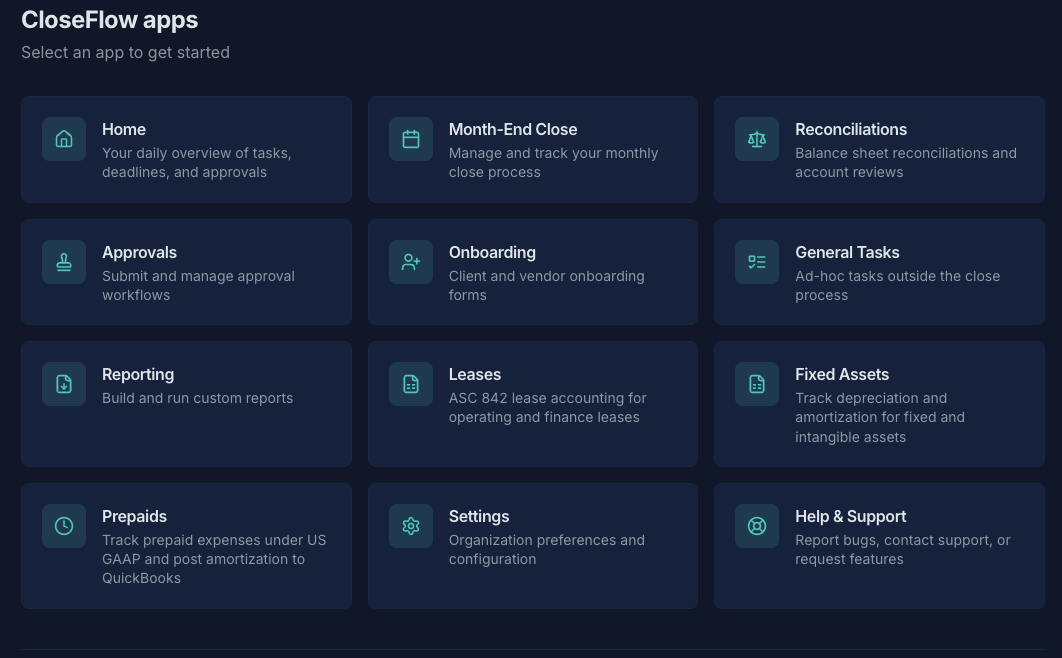
Every app, on every plan
Close Tasks, General Tasks, Reconciliations, Approvals, Vendor & Customer Onboarding, Prepaids, Leases, and Fixed Assets.
Close Tasks
Recurring close tasks with owners and due dates. The month-end close app works without connecting QuickBooks.
Learn MoreGeneral Tasks
Ad-hoc tasks and projects outside the close cycle, with the same owner and status tools.
Learn MoreReconciliations
Balance sheet reconciliations with checklists, attachments, and preparer and reviewer sign-off.
Learn MoreApprovals
Route bills, purchase orders, and expenses through configurable multi-step approval flows.
Learn MoreVendor & Customer Onboarding
Collect W-9s, banking info, and company details through branded self-service forms.
Learn MorePrepaids
Track prepaid expenses, calculate amortization, and push the monthly journal entry to QuickBooks after approval.
Learn MoreLeases
ASC 842 lease schedules for the ROU asset and lease liability. Monthly journal entries push to QuickBooks after approval.
Learn MoreFixed Assets
Fixed asset register with straight-line, 200% and 150% declining balance, and sum-of-the-years'-digits depreciation. Approved monthly entries push to QuickBooks.
Learn MoreConnect QuickBooks Online and Intuit Enterprise Suite when you need them
The month-end close app works without a QuickBooks connection. Connect QuickBooks Online or Intuit Enterprise Suite when you want trial balances, new vendors and customers, and approved journal entries to sync.
Auto-Sync Trial Balances
Pull account balances directly into your reconciliations — no spreadsheets needed.
Vendor & Customer Sync
Approved vendors and customers flow directly into QuickBooks as new records.
Bill & PO Approval → QBO
Approved bills and purchase orders push back to QuickBooks automatically.
Unified Reporting
Report across CloseFlow and QuickBooks data in a single dashboard.
Secure OAuth 2.0
Token-based connection keeps your QuickBooks credentials safe.
Real-Time Status
See sync status, errors, and last-updated timestamps at a glance.
Security & Controls
Role-based access, activity logs, and OAuth connections for QuickBooks.
Encryption in transit
Connections use TLS.
Row-Level Security
Organization-level data isolation enforced at the database layer.
Role-Based Access
Admin, member, and auditor roles with granular app-level permissions.
Activity logs
Actions are logged with who did what, and when.
Approval Controls
Multi-step approval flows with threshold-based routing.
OAuth 2.0
Secure third-party integrations with token-based authentication.
What Our Customers Say
CloseFlow has made the approval process for bills fully streamlined. I run a data department where bills are often variable, based on usage. The tool makes it so easy to see what we paid in prior months and where my costs are changing. It helps me stay on top of what matters.
QuickBooks close software FAQs
What is CloseFlow?
CloseFlow is month-end close software for QuickBooks Online and Intuit Enterprise Suite. Every plan includes Close Tasks, General Tasks, Reconciliations, Approvals, Vendor and Customer Onboarding, Prepaids, Leases, and Fixed Assets, with unlimited users. QuickBooks remains the accounting system.
Does the month-end close app require a QuickBooks connection?
No. The month-end close app works without connecting QuickBooks. You can run recurring close tasks, owners, and due dates on their own. Connect QuickBooks Online or Intuit Enterprise Suite when you want trial-balance sync, vendor and customer sync, or approved journal entries to push.
How do journal entries get into QuickBooks?
Journal entries from fixed assets, prepaids, and leases are generated automatically. They push to QuickBooks only after approval. There is an optional setting to push an entry automatically once it is approved. CloseFlow does not post entries with no review, and it does not post them on a timer.
Which apps are included?
Every plan includes Close Tasks, General Tasks, Reconciliations, Approvals, Vendor and Customer Onboarding, Prepaids, Leases, and Fixed Assets. There are no app add-ons and no per-user fees.
How much does CloseFlow cost?
CloseFlow is priced per organization, with unlimited users and every app included: $99/month for 1 organization, $199/month for 3, $299/month for 10, and $499/month for 25. Above 25 organizations, talk to us about firm pricing. 30-day free trial, no credit card required.
Can we try CloseFlow without a credit card?
Yes. Start a free 30-day trial with no credit card required. Every app and unlimited users are included. Use the trial on a real close period before you choose a paid plan.
Try CloseFlow Free for 30 Days
Full access to Close Tasks, General Tasks, Reconciliations, Approvals, Vendor & Customer Onboarding, Prepaids, Leases, and Fixed Assets. No credit card required.
Start Your Free Trial